
GDPR and Google Analytics
Google Analytics is generally essential to see how many users visit your website, where they come from, and what they actually do on the site.
For those based in the EU, strict rules apply when using such analysis tools. The user's privacy must be taken into account.
At the very least, you should therefore consider the following five points to be on the safe side legally:
- Conclude a data processing agreement with Google
- Inform the user about the use of cookies
- Anonymize IP addresses
- Offer an opt-out option
- Google Analytics in the privacy policy
Data Processing Agreement
Because Google acts legally on behalf of the website operator, you should also conclude a data processing agreement.
This data processing will also remain permitted in the future under the GDPR. This means that anyone using Google Analytics on their site must conclude a data processing agreement with Google. This may be signed electronically.
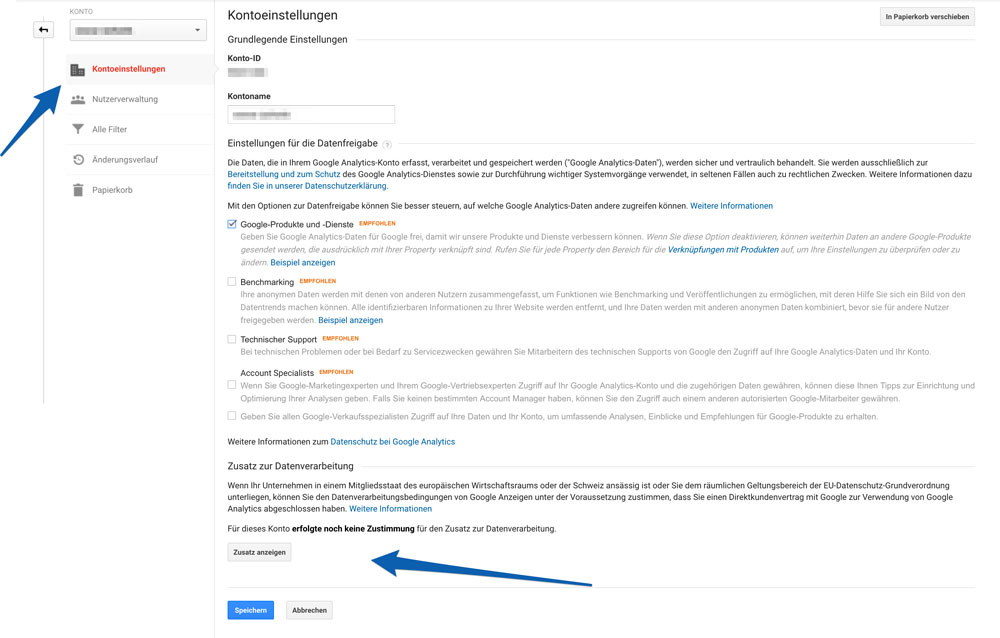
To do this, simply click on "View terms" at the very bottom of the account settings in the admin view at the account level, then click "Accept" and finally save.
Cookie Consent
Google Analytics sets cookies in the user's browser. According to European case law, however, informed consent from the user is required for all cookies that are not absolutely necessary for the user to use the website without restrictions.
To obtain this consent, it is best to use a cookie consent overlay that informs the user about the use of cookies when they first access the website. In addition to a consent button, you should probably also add a link for more information on the privacy policy page. There are various ready-made solutions for this, such as the free-to-use solution from silktide or various WordPress plugins.
Anonymize IP addresses
Some changes should also be made in the Google Analytics code. Firstly, you should anonymize the IP addresses.
If you have integrated the code hardcoded – i.e., directly via the header.php file or similar – you simply extend the tracking code by a few characters. If you use the Universal Analytics snippet, add the snippet in the code BEFORE the line ga('send', 'pageview');
ga(’set‘, ‚anonymizeIp‘, true);If, on the other hand, you are already using the new Global Site Tag, extend the line with the snippetgtag(‚config‘, ‚UA-XXXXXXXX-X‘);with the anonymize IP info:gtag(‚config‘, ‚UA-XXXXXXXX-X‘, { ‚anonymize_ip‘: true });
Anyone using a plugin like MonsterInsights (formerly Yoast Google Analytics) will find a checkbox in the settings. This anonymizes the last digits of the user's IP address, so that it should no longer be possible to trace the user back to an individual computer. Don't worry, the information is still sufficient to determine the origin of the users.
Anonymize IP addresses via GTM
Anyone using Google Tag Manager (GTM) to pass data to Google Analytics must add a field named "anonymizeIp" and the value "true" under More Settings – Fields to Set when creating the tag.
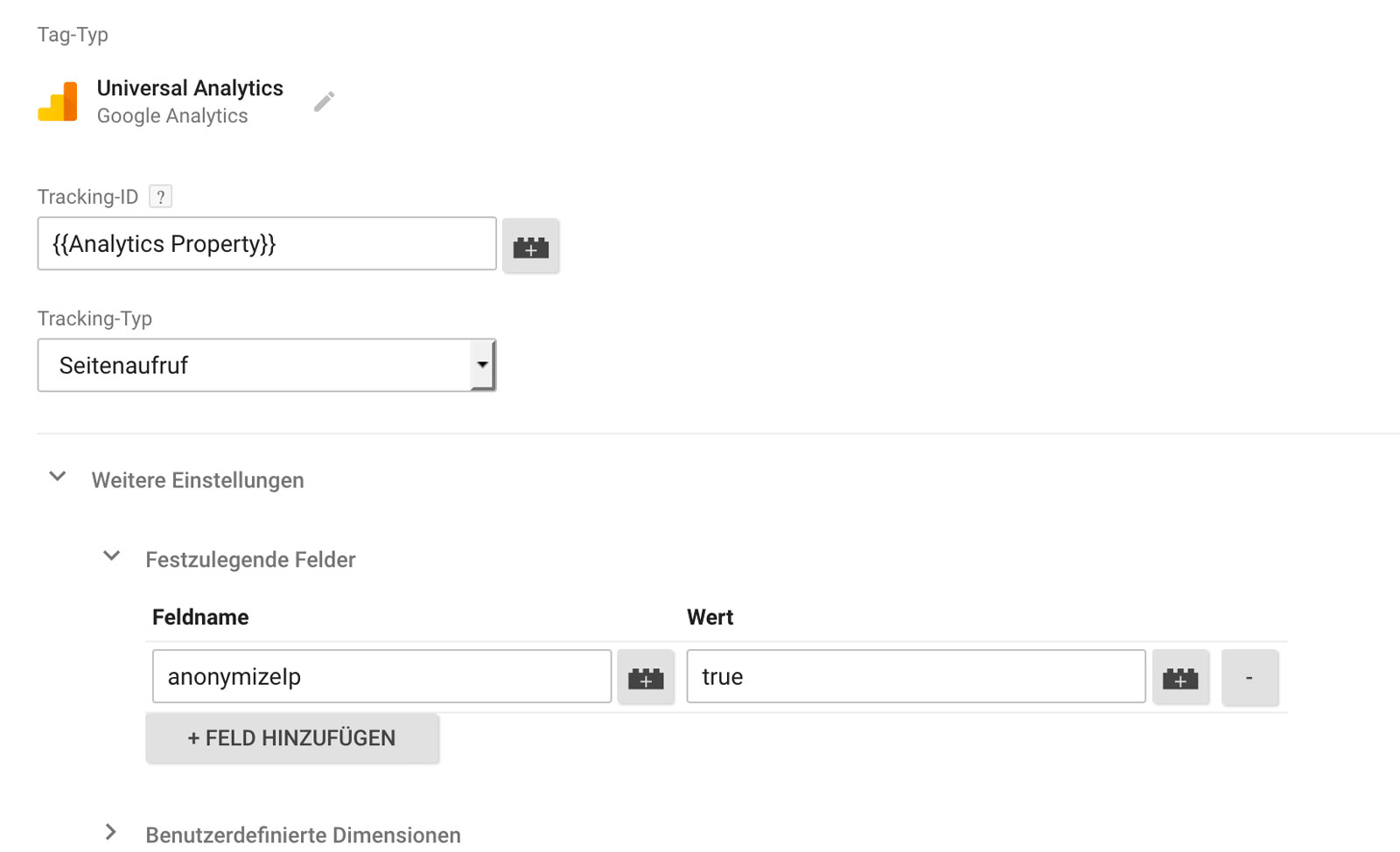
Since you can now save the Google Analytics settings in your own Google Analytics Settings variable, it naturally makes sense to save the IP anonymization as a field to be set in this global variable once, so as not to have to do it for each tag individually.
Anyone using Google Analytics on AMP pages does not have to worry about the anonymization of IP addresses, because AMP analytics anonymizes IPs by default. (So don't be surprised that there is no option to specify a field to set for tags in GTM AMP containers.)
Offer opt-out options
Google itself offers users the possibility to opt out of data collection for all Google Analytics installations, either via setting a cookie or via a browser add-on.
As an operator, you should still offer users the option to only opt out of data collection on your own website. And that works as follows:
Anyone who has integrated their Google Analytics code "by hand" in the head of their website simply places the following code BEFORE the Google Analytics tracking code. For the Universal Analytics code
var gaProperty = ‚UA-XXXXXXXX-X‘;

var disableStr = ‚ga-disable-‚ + gaProperty; if (document.cookie.indexOf(disableStr + ‚=true‘) > -1) { window[disableStr] = true; }

function gaOptout() { document.cookie = disableStr + ‚=true; expires=Thu, 31 Dec 2099 23:59:59 UTC; path=/‘; window[disableStr] = true; }
Of course, you have to replace UA-XXXXXXXXX-X with the number combination of your own Google Analytics property. Once that is done, you can offer the user an opt-out link that executes our new function and thus sets a cookie in the user's browser. To do this, simply link javascript:gaOptout():
The cookie is saved in the user's browser. If the user deletes their cookies, the opt-out cookie is of course also lost. If they visit your page with another device or browser, they do not have the cookie and would have to perform the opt-out process again.
This opt-out cookie also works if the Google Analytics tag is fed into the page via the Tag Manager. And of course, the entire opt-out code can also be integrated into the page via Tag Manager.
Google Analytics in the privacy policy
Include the following explanation in your privacy policy:
Um den Aufbau und die Navigation unseres Webauftritts zu analysieren, zu verbessern und diesen auf Ihre Bedürfnisse zuzuschneiden, verwenden wir auf unserer Website Analysetools. Diese Website verwendet Google Analytics. Dabei handelt es sich um einen Webanalysedienst von Google Inc. („Google“). Dieser Analysedienst verwendet Cookies, also kleine Dateien, die auf dem Computer gespeichert werden und die eine Analyse der Nutzung unserer Website ermöglichen. Informationen über die Nutzung unserer Webseite, die unter Verwendung von Cookies gesammelt werden, dienen dazu, die allgemeine Nutzung der Website auszuwerten, um es uns zu ermöglichen, Reports über die Websiteaktivitäten zusammenzustellen und so in der Lage zu sein, unsere Webseite weiter zu optimieren und um weitere mit der Webseiten- und Internetnutzung verbundene Services zu erbringen. Die von Google Analytics mit Hilfe von Cookies erzeugten Informationen über die Nutzung der Webseite werden – einschließlich der anonymisierten IP-Adresse an einen Server von Google Inc. in die USA übermittelt. Die Anonymisierung erfolgt durch die Entfernung der letzten acht Bit der IP-Adresse, wodurch eine eindeutige Zuordnung der ermittelten Daten zu einer bestimmten IP-Adresse nicht mehr möglich ist. Diese Information wird an Behörden oder Dritte übermittelt, wenn diese Übermittlung gesetzlich erforderlich ist oder wenn Dritte im Auftrag von Google als Dienstleister tätig sind. Es besteht jedoch die Möglichkeit, die Speicherung von Cookies durch entsprechende Einstellungen im Browser zu verhindern. Wenn in den Einstellungen des Browsers die Zustimmung zur Speicherung von Cookies verweigert wird, kann es jedoch sein, dass bestimmte Funktionen unserer Webseite nicht mehr zur Verfügung stehen. Mit der Nutzung unserer Webseite erklärt man sich mit der Verwendung von Google Analytics einverstanden. Weitere Informationen zu Google Analytics finden sich unter: http://www.google.at/intl/de/analytics. Informationen zur Privacy Policy von Google findet man unter http://www.google.de/policies/privacy. Hier findet man eine Möglichkeit, wie man die Nutzung von Google Analytics und die damit verbundene Datenübermittlung an Google unterbinden kann https://tools.google.com/dlpage/gaoptout?hl=de.
Sources:
www.kloos.at
www.drschwenke.de
